AnyToGif2.0
Publisher Description
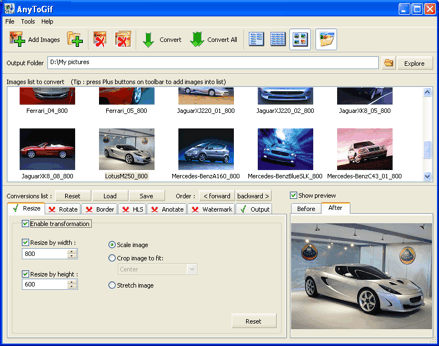
There are a lot of graphic editors. They are created for viewing and editing one image. What if you need to convert files of one format and work them up according to one scheme? What if you have dozens of files to be worked up? You will need months and months if you do it by means of usual graphic editor.
To make the process quick and fully automatic we suggest you using an optimized program for graphic work up of file groups.
Converter "AnyToGif" allows you to convert any image to gif-format and edit it by means of such function as rotating, stretch, crop, border, etc. It is easy to use and does not require any special skills. "AnyToGif" helps you to convert easily dozens of files and work them up according to one scheme using simple and quite understandable interface of the program.
"AnyToGif" supports basic graphic formats: GIF, BMP, JPEG, PCX, PSD, TIFF, etc.
This software is developed and tested under Windows 95/98/NT/2000/Xp operating systems.
About AnyToGif
This Converters & Optimizers program is available in English. It was last updated on 29 September, 2026. AnyToGif is compatible with the following operating systems: Windows.
The company that develops AnyToGif is PhotoActions. The latest version released by its developer is 2.0. This version was rated by 1 users of our site and has an average rating of 4.0.
The download we have available for AnyToGif has a file size of 2.1 MB. Just click the green Download button above to start the downloading process. The program is listed on our website since 2007-11-07 and was downloaded 470 times. We have already checked if the download link is safe, however for your own protection we recommend that you scan the downloaded software with your antivirus. Your antivirus may detect the AnyToGif as malware if the download link is broken.
How to install AnyToGif on your Windows device:
- Click on the Download button on our website. This will start the download from the website of the developer.
- Once the AnyToGif is downloaded click on it to start the setup process (assuming you are on a desktop computer).
- When the installation is finished you should be able to see and run the program.
Program Details
System requirements
Download information
Pricing
Version History
version 2.0
posted on 2007-11-07
option "Convert all subimages from multi-pages images" was added
new graphic formats was added
Now you can change order of conversion options for apply to image
version 1.3
posted on 2004-12-23
Now you can add text watermark to the images
Now you can add picture watermark to the images
